DeepSeek-OCR 模型部署最佳实践
开发调试到生产上线,全流程仅需一个工作区——DevPod重新定义AI工程化标准,当开发与部署不再割裂,模型价值才真正释放。
概述
本文档详细介绍如何在 FunModel 平台上部署 DeepSeek-OCR 模型的最佳实践。通过使用 DevPod 云端开发环境,您将学会如何开发、调试和部署 DeepSeek-OCR 模型服务,实现从开发到生产的全链路自动化部署。
DeepSeek-OCR 是一个先进的光学字符识别模型,能够高效处理图像和 PDF 文档中的文字识别任务。本指南将引导您完成模型服务的构建和部署过程。
先决条件
在开始之前,请确保您已完成以下准备工作:
- 拥有一个阿里云账号
- 登录 FunModel 控制台
根据控制台的指引,完成 RAM 相关的角色授权等配置;如果您当前使用的是旧版控制台页面,请点击右上角的"新版控制台"按钮,切换至新版界面后再进行操作。
- 具备基本的 Python 和深度学习模型部署知识
开发与调试
本节介绍如何在 DevPod 环境中开发和调试 DeepSeek-OCR 模型服务。
环境准备
在 DevPod 中启动 DeepSeek-OCR 环境实例后,您将获得一个配备 GPU 的云端 VSCode 开发环境。该环境已预装所有必要的依赖,包括 PyTorch、vLLM、Transformers 等深度学习框架。
/workspace/DeepSeek-OCR/DeepSeek-OCR-master/DeepSeek-OCR-vllm/server.py
import os
import io
import torch
import uvicorn
import requests
from PIL import Image
from fastapi import FastAPI, HTTPException
from pydantic import BaseModel
from typing import Optional, Dict, Any, List
import tempfile
import fitz
from concurrent.futures import ThreadPoolExecutor
import asyncio

# Set environment variables
if torch.version.cuda == '11.8':
    os.environ["TRITON_PTXAS_PATH"] = "/usr/local/cuda-11.8/bin/ptxas"
os.environ['VLLM_USE_V1'] = '0'
os.environ["CUDA_VISIBLE_DEVICES"] = '0'

from config import MODEL_PATH, CROP_MODE, MAX_CONCURRENCY, NUM_WORKERS
from vllm import LLM, SamplingParams
from vllm.model_executor.models.registry import ModelRegistry
from deepseek_ocr import DeepseekOCRForCausalLM
from process.ngram_norepeat import NoRepeatNGramLogitsProcessor
from process.image_process import DeepseekOCRProcessor

# Register model
ModelRegistry.register_model("DeepseekOCRForCausalLM", DeepseekOCRForCausalLM)

# Initialize model
print("Loading model...")
llm = LLM(
    model=MODEL_PATH,
    hf_overrides={"architectures": ["DeepseekOCRForCausalLM"]},
    block_size=256,           # Memory block size for KV cache
    enforce_eager=False,      # Use eager mode for better performance with multimodal models
    trust_remote_code=True,   # Allow execution of code from remote repositories
    max_model_len=8192,       # Maximum sequence length the model can handle
    swap_space=0,             # No swapping to CPU, keeping everything on GPU
    max_num_seqs=max(MAX_CONCURRENCY, 100),  # Maximum number of sequences to process concurrently
    tensor_parallel_size=1,   # Number of GPUs for tensor parallelism (1 = single GPU)
    gpu_memory_utilization=0.9,  # Use 90% of GPU memory for model execution
    disable_mm_preprocessor_cache=True  # Disable cache for multimodal preprocessor to avoid issues
)

# Configure sampling parameters
# NoRepeatNGramLogitsProcessor prevents repetition in generated text by tracking n-gram patterns
logits_processors = [NoRepeatNGramLogitsProcessor(ngram_size=20, window_size=50, whitelist_token_ids={128821, 128822})]
sampling_params = SamplingParams(
    temperature=0.0,                    # Deterministic output (greedy decoding)
    max_tokens=8192,                    # Maximum number of tokens to generate
    logits_processors=logits_processors, # Apply the processor to avoid repetitive text
    skip_special_tokens=False,          # Include special tokens in the output
    include_stop_str_in_output=True,    # Include stop strings in the output
)

# Initialize FastAPI app
app = FastAPI(title="DeepSeek-OCR API", version="1.0.0")

class InputData(BaseModel):
    """
    Input data model to define what types of documents to process
    images: Optional list of image URLs to process
    pdfs: Optional list of PDF URLs to process
    Note: At least one of these fields must be provided in a request
    """
    images: Optional[List[str]] = None
    pdfs: Optional[List[str]] = None

class RequestData(BaseModel):
    """
    Main request model that defines the input data and optional prompt
    """
    input: InputData
    # Add prompt as an optional field with a default value
    prompt: str = '<image>\nFree OCR.' # Default prompt

class ResponseData(BaseModel):
    """
    Response model that returns OCR results for each input document
    """
    output: List[str]

def download_file(url: str) -> bytes:
    """Download file from URL"""
    try:
        response = requests.get(url, timeout=30)
        response.raise_for_status()
        return response.content
    except Exception as e:
        raise HTTPException(status_code=400, detail=f"Failed to download file from URL: {str(e)}")

def is_pdf_file(content: bytes) -> bool:
    """Check if the content is a PDF file"""
    return content.startswith(b'%PDF')

def load_image_from_bytes(image_bytes: bytes) -> Image.Image:
    """Load image from bytes"""
    try:
        image = Image.open(io.BytesIO(image_bytes))
        return image.convert('RGB')
    except Exception as e:
        raise HTTPException(status_code=400, detail=f"Failed to load image: {str(e)}")

def pdf_to_images(pdf_bytes: bytes, dpi: int = 144) -> list:
    """Convert PDF to images"""
    try:
        images = []
        pdf_document = fitz.open(stream=pdf_bytes, filetype="pdf")
        zoom = dpi / 72.0
        matrix = fitz.Matrix(zoom, zoom)

        for page_num in range(pdf_document.page_count):
            page = pdf_document[page_num]
            pixmap = page.get_pixmap(matrix=matrix, alpha=False)
            img_data = pixmap.tobytes("png")
            img = Image.open(io.BytesIO(img_data))
            images.append(img.convert('RGB'))

        pdf_document.close()
        return images
    except Exception as e:
        raise HTTPException(status_code=400, detail=f"Failed to convert PDF to images: {str(e)}")

def process_single_image_sync(image: Image.Image, prompt: str) -> Dict: # Renamed and made sync
    """Process a single image (synchronous function for CPU-bound work)"""
    try:
        cache_item = {
            "prompt": prompt,
            "multi_modal_data": {
                "image": DeepseekOCRProcessor().tokenize_with_images(
                    images=[image],
                    bos=True,
                    eos=True,
                    cropping=CROP_MODE
                )
            },
        }
        return cache_item
    except Exception as e:
        raise HTTPException(status_code=500, detail=f"Failed to process image: {str(e)}")

async def process_items_async(items_urls: List[str], is_pdf: bool, prompt: str) -> tuple[List[Dict], List[int]]:
    """
    Process a list of image or PDF URLs asynchronously.
    Downloads files concurrently, then processes images/PDF pages in a thread pool.
    Returns a tuple: (batch_inputs, num_results_per_input)
    """
    loop = asyncio.get_event_loop()

    # 1. Download all files concurrently
    download_tasks = [loop.run_in_executor(None, download_file, url) for url in items_urls]
    contents = await asyncio.gather(*download_tasks)

    # 2. Prepare arguments for processing (determine if PDF/image, count pages)
    processing_args = []
    num_results_per_input = []
    for idx, (url, content) in enumerate(zip(items_urls, contents)):
        if is_pdf:
            if not is_pdf_file(content):
                 raise HTTPException(status_code=400, detail=f"Provided file is not a PDF: {url}")
            images = pdf_to_images(content)
            num_pages = len(images)
            num_results_per_input.append(num_pages)
            # Each page will be processed separately
            processing_args.extend([(img, prompt) for img in images])
        else: # is image
            if is_pdf_file(content):
                # Handle case where an image URL accidentally points to a PDF
                images = pdf_to_images(content)
                num_pages = len(images)
                num_results_per_input.append(num_pages)
                processing_args.extend([(img, prompt) for img in images])
            else:
                image = load_image_from_bytes(content)
                num_results_per_input.append(1)
                processing_args.append((image, prompt))

    # 3. Process images/PDF pages in parallel using ThreadPoolExecutor
    with ThreadPoolExecutor(max_workers=NUM_WORKERS) as executor:
        # Submit all processing tasks
        process_tasks = [
            loop.run_in_executor(executor, process_single_image_sync, img, prompt)
            for img, prompt in processing_args
        ]
        # Wait for all to complete
        processed_results = await asyncio.gather(*process_tasks)

    return processed_results, num_results_per_input

async def run_inference(batch_inputs: List[Dict]) -> List:
    """Run inference on batch inputs"""
    if not batch_inputs:
        return []
    try:
        # Run inference on the entire batch
        outputs_list = llm.generate(
            batch_inputs,
            sampling_params=sampling_params
        )
        return outputs_list
    except Exception as e:
        raise HTTPException(status_code=500, detail=f"Failed to run inference: {str(e)}")

@app.post("/ocr_batch", response_model=ResponseData)
async def ocr_batch_inference(request: RequestData):
    """
    Main OCR batch processing endpoint
    Accepts a list of image URLs and/or PDF URLs for OCR processing
    Returns a list of OCR results corresponding to each input document
    Supports both individual image processing and PDF-to-image conversion
    """
    print(f"Received request data: {request}")
    try:
        input_data = request.input
        prompt = request.prompt # Get the prompt from the request
        if not input_data.images and not input_data.pdfs:
            raise HTTPException(status_code=400, detail="Either 'images' or 'pdfs' (or both) must be provided as lists.")

        all_batch_inputs = []
        final_output_parts = []

        # Process images if provided
        if input_data.images:
            batch_inputs_images, counts_images = await process_items_async(input_data.images, is_pdf=False, prompt=prompt)
            all_batch_inputs.extend(batch_inputs_images)
            final_output_parts.append(counts_images)

        # Process PDFs if provided
        if input_data.pdfs:
            batch_inputs_pdfs, counts_pdfs = await process_items_async(input_data.pdfs, is_pdf=True, prompt=prompt)
            all_batch_inputs.extend(batch_inputs_pdfs)
            final_output_parts.append(counts_pdfs)

        if not all_batch_inputs:
             raise HTTPException(status_code=400, detail="No valid images or PDF pages were processed from the input URLs.")

        # Run inference on the combined batch
        outputs_list = await run_inference(all_batch_inputs)

        # Reconstruct final output list based on counts
        final_outputs = []
        output_idx = 0
        # Flatten the counts list
        all_counts = [count for sublist in final_output_parts for count in sublist]

        for count in all_counts:
            # Get 'count' number of outputs for this input
            input_outputs = outputs_list[output_idx : output_idx + count]
            output_texts = []
            for output in input_outputs:
                content = output.outputs[0].text
                if '<|end▁of▁sentence|>' in content:
                    content = content.replace('<|end▁of▁sentence|>', '')
                output_texts.append(content)

            # Combine pages if it was a multi-page PDF input (or image treated as PDF)
            if count > 1:
                combined_text = "\n<--- Page Split --->\n".join(output_texts)
                final_outputs.append(combined_text)
            else:
                # Single image or single-page PDF
                final_outputs.append(output_texts[0] if output_texts else "")

            output_idx += count # Move to the next set of outputs

        return ResponseData(output=final_outputs)

    except HTTPException:
        raise
    except Exception as e:
        raise HTTPException(status_code=500, detail=f"Internal server error: {str(e)}")


@app.get("/health")
async def health_check():
    """Health check endpoint"""
    return {"status": "healthy"}

@app.get("/")
async def root():
    """Root endpoint"""
    return {"message": "DeepSeek-OCR API is running (Batch endpoint available at /ocr_batch)"}

if __name__ == "__main__":
    uvicorn.run(app, host="0.0.0.0", port=8000, workers=1)
local 测试
# 终端启动推理服务
$ python /workspace/DeepSeek-OCR/DeepSeek-OCR-master/DeepSeek-OCR-vllm/server.py

# 开启另外一个终端
$ curl -X POST \
  -H "Content-Type: application/json" \
  -d '{
    "input": {
      "pdfs": [
        "https://images.devsapp.cn/test/ocr-test.pdf"
      ]
    },
    "prompt": "<image>\nFree OCR."
  }' \
  http://127.0.0.1:8000/ocr_batch
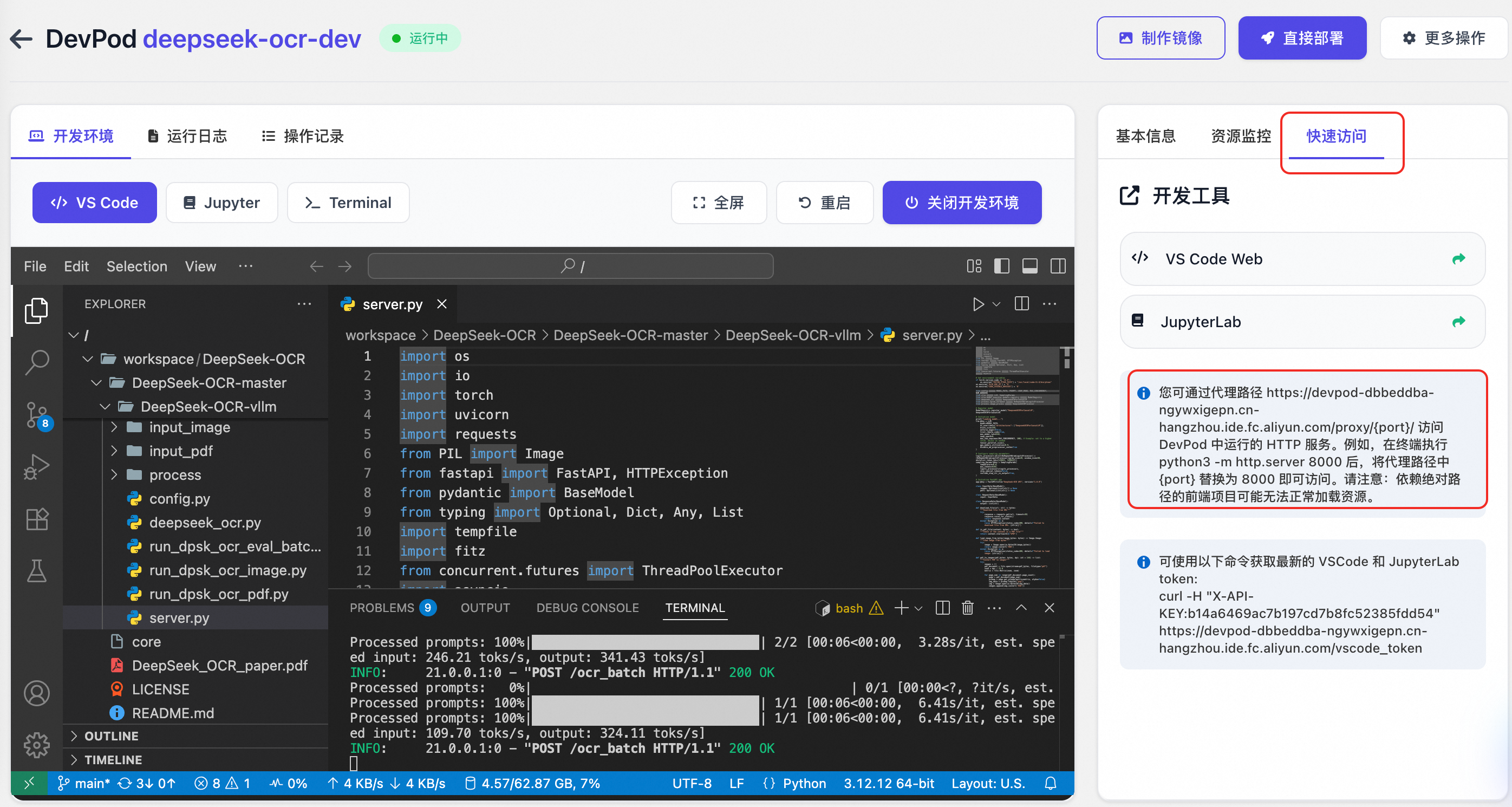
也可以通过快速访问 tab 获取代理路径,比如: https://devpod-dbbeddba-ngywxigepn.cn-hangzhou.ide.fc.aliyun.com/proxy/8000/, 并通过外部的 Postman 等客户端工具直接调用调试。
测试 image
$ curl -X POST \
  -H "Content-Type: application/json" \
  -d '{
    "input": {
      "images": [
        "https://paddle-model-ecology.bj.bcebos.com/paddlex/imgs/demo_image/paddleocr_vl_demo.png"
      ]
    },
    "prompt": "<image>\n<|grounding|>Convert the document to markdown."
  }' \
  "https://devpod-dbbeddba-ngywxigepn.cn-hangzhou.ide.fc.aliyun.com/proxy/8000/ocr_batch"
测试 pdf
$ curl -X POST \
  -H "Content-Type: application/json" \
  -d '{
    "input": {
      "pdfs": [
        "https://images.devsapp.cn/test/ocr-test.pdf"
      ]
    },
    "prompt": "<image>\nFree OCR."
  }' \
  "https://devpod-dbbeddba-ngywxigepn.cn-hangzhou.ide.fc.aliyun.com/proxy/8000/ocr_batch"
示例:

混合
$ curl -X POST \
  -H "Content-Type: application/json" \
  -d '{
    "input": {
      "pdfs": [
        "https://images.devsapp.cn/test/ocr-test.pdf"
      ],
      "images": [
        "https://paddle-model-ecology.bj.bcebos.com/paddlex/imgs/demo_image/paddleocr_vl_demo.png"
      ]
    },
    "prompt": "<image>\nFree OCR."
  }' \
  "https://devpod-dbbeddba-ngywxigepn.cn-hangzhou.ide.fc.aliyun.com/proxy/8000/ocr_batch"
DevPod 的优势在于:所有依赖已预装,GPU 资源即开即用,开发者可以专注于算法优化和业务逻辑,而非环境问题。
镜像构建与部署
当模型在开发环境中验证通过后,下一步是将其封装为镜像交付物并部署到生产环境。
镜像构建
在 FunModel 的 DevPod 中,可以将当前开发环境一键构建成容器镜像:
- 在 DevPod 控制台点击 制作镜像
- 选择 ACR 实例并配置镜像信息
- 系统将自动构建并推送镜像到指定容器仓库
详情:更多关于镜像构建的详细步骤,请参考 DevPod 镜像构建与ACR集成。
模型部署
镜像构建推送完毕后,镜像已经存储到 ACR,此时可以一键部署为 FunModel 模型服务。
- 在镜像构建完成后,点击 直接部署
- 配置服务参数(如启动命令、监听端口、超时时间等)
- 点击 开始部署,系统将自动部署模型服务
监控与迭代
部署不是终点。DevPod 与 FunModel 深度集成,提供了完整的监控面板:
- 性能监控:实时查看 GPU 利用率、请求延迟、吞吐量
- 日志分析:集中收集所有实例日志,支持关键词检索
- 变更部署记录:每次变更配置(如卡型、扩缩容策略、 timeout 等)的部署都有记录追溯
- 在线快捷调试:快速测试部署后的模型服务
当需要优化模型或修复问题时,开发者可以:
- 在监控中发现问题
- 直接打开 DevPod 继续开发调试
- 验证修复方案
- 制作新的镜像,一键部署
整个过程在统一环境中完成,避免了环境不一致导致的问题,真正实现了开发与运维的无缝协作。
最佳实践总结
使用 DevPod 部署 DeepSeek-OCR 模型服务的完整工作流:
- 环境一致性:开发、测试、生产环境完全一致,消除"环境漂移"
- 资源弹性:按需分配 GPU 资源,开发时低配,生产时高配
- 工作流集成:无需在多个平台间切换,所有操作在一个工作区完成
- 部署零学习曲线:无需掌握 K8s、Dockerfile 等复杂概念,专注业务价值
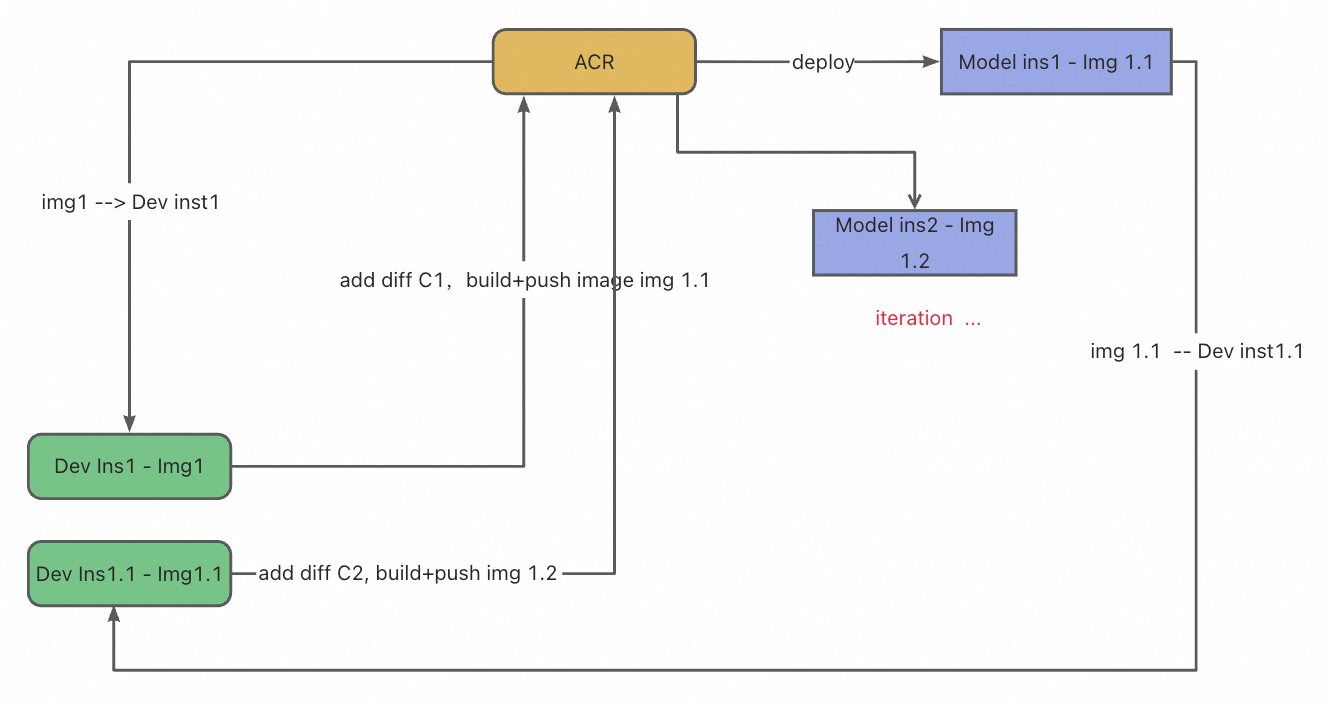
DevFlow1:云端开发与部署的无缝闭环
DevFlow1 描绘了开发者基于 DevPod 实现的高效工作流:
- 开发者首先启动一个预配置的云端开发环境——已内置所需依赖与 GPU 资源,可即刻进行代码编写与调试。
- 代码修改完成后,无需手动编写 Dockerfile 或管理构建流程,只需一键操作,系统即自动将当前开发环境与代码打包为标准化镜像。
- 该镜像可直接部署为生产级服务,对外提供 API 接口。
- 当需要迭代优化时,开发者可无缝返回开发环境继续修改,再次一键构建并更新线上服务。
整个流程实现了从开发、调试到部署、迭代的全链路自动化,彻底屏蔽了基础设施的复杂性,让开发者真正聚焦于业务逻辑与模型优化本身。
DevFlow2:面向工程化的开发者工作流
DevFlow2 适用于熟悉容器化与工程化实践的开发者。该工作流为追求工程规范与长期可维护性的团队提供了对部署细节的精细控制。
- 开发阶段:开发者从代码仓库的指定稳定版本(Commit)切入,启动专属开发环境,进行代码迭代、依赖安装及集成测试。
- 准备部署:一旦测试验证通过且结果符合预期,开发者即可着手准备部署:手动编写或调整 Dockerfile,精确配置镜像构建逻辑,并按需设定函数入口或服务参数。
- 构建与测试:系统依据该 Dockerfile 重建镜像,并执行端到端测试,以确保生产环境中的行为一致性。
- 发布流程:最终,代码与 Dockerfile 变更一同提交至 Git,完成一次标准、可追溯且可复现的发布流程。
此流程赋予开发者对部署细节的精细控制,契合追求工程规范与长期可维护性的团队需求。

通过使用 DevPod 部署 DeepSeek-OCR 模型服务,开发者可以实现从开发、调试到部署、迭代的全链路自动化流程。FunModel 平台通过 AI 开发范式的转变,实现了从"先建基础设施,再开发模型"到"先验证想法,再扩展规模"的转变。DevPod 作为这一变革的核心载体,让 AI 开发者能够专注于模型优化本身,而非被工具和环境所束缚。